2D Shots of 3D Objects
When you have a three-dimensional CAD object and you need a two-dimensional version, you have several options. January 21, 2010
Question
I have 3D AutoCAD drawings I need to convert to 2D line drawings either in Inventor or AutoCAD. Help!
Forum Responses
(CAD Forum)
From contributor J:
Are you asking for someone to do this for you or do you just need to know how it’s done? In AutoCAD you can use the flatten command and the Z will set to 0, making it a 2D. There are some issues with this and could be a pain depending on how it was drawn.
From the original questioner:
I received a drawing done in 3D solid and I need to make it into a 2D line drawing. Thanks.
From contributor S:
Don't use flatten command - it distorts and brings the drawing out of proportion. There is a "SOLPROF" command that you need to use to extract elevations and "SECTION" command to generate plan and vertical sections. See AutoCAD help on these topics.
From contributor O:
Or you can use the menu to execute the command.
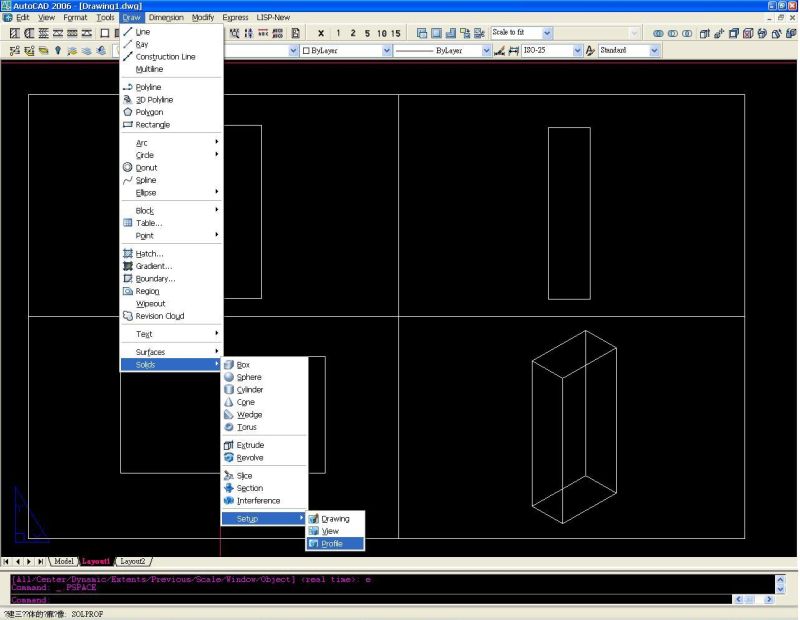
Click here for higher quality, full size image
From contributor G:
My preferred command for this is called flatshot. Simply get the view you want in model space, type flatshot, and it will create a 2D block of what you see on the screen that you can explode to modify, or not.
