CAD/CAM Software for Curved CNC Work
This discussion of software for curved CNC work includes some interesting photos of unique examples. January 28, 2009
Question
We have a Weeke 33 CNC with WoodWop and Cabinet Ware. We do commercial and residential work with many radius receptions desks and islands and counter tops. We are considering purchasing Alphacam to help us with this but I don't know that it will be that much more useful to us than what we already have. Is Alphacam really that much better than WoodWop? Currently we don't have an Autocad type program that will convert DXF files so we can use them on our Weeke. Obviously Cabware handles 90% of our items just fine but has real weaknesses when it comes to radius items. We use our machine primarily for nested based operations. We are also wondering what other opportunities owning AlphaCam would offer us. Just thought I would see what opinions are out there about our situation. Thanks in advance for your input.
Forum Responses
(CNC Forum)
From contributor K:
I tested other packages and coming from an AutoCad background opted for Alphacam and I never looked back. I also do a lot of radius counters and the CNC with Alphacam revolutionized production. I'd have all the components cut out and ready for assembly before I'd have jigs made in the old days. Also DXF file sharing between both programmers works pretty well just a few issues easily overcome.
From contributor D:
AlphaCam is a great program but you may want to develop some CAD skills first. For reception counters, a cheap cad program downloaded off of the net and the posted through WoodWOP's DXF post processor will really change the world for you. I would highly recommend learning this route and then looking at Alphacam if you eventually outgrow that process.
From contributor H:
We have a Homag BOF311 so we too are running WoodWOP. I program with Alphacam in the office and am able to do things that just could not be done with WoodWOP alone. I do a lot of carving for one off pieces or for parts that would just take too long to do by hand. I also create solid models for client presentation. While Alphacam is by no means a solid modeler like Solid Works, it does work very well once you've spent enough time with it to get familiar. The image below shows some work I've done. The image in the upper left is a boat bar that was done completely by me. The planking on the hull had to have a curve on it so it would appear horizontal, and only took seconds to achieve. It is a really great program and if you are doing that much radius work it’s worth a look. Improving your CAD skills will only help you. I would not however use Alphacam as my only CAD package. Good luck.
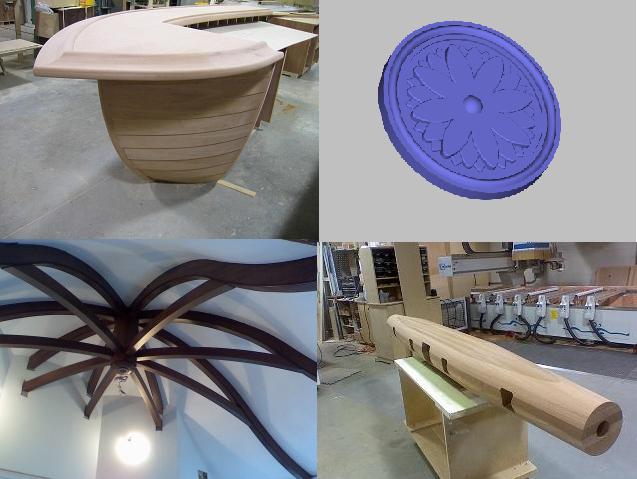
Click here for full size image
From contributor M:
I can't really speak too much to WoodWOP, but I am very familiar with Alphacam, using it for over ten years. Among the many advantages are 3D toolpathing, support for every machine out there, great tech support, easily available training, a great merge with CV & CW, fairly powerful parametrics, robust nesting, and the list goes on and on. You can import DXF, Autocad, IGES, Rhino (which is another very cool 3D surfacing package for pretty cheap) geometry and many others. Sounds like a sales pitch, I know, but you run an expensive machine, and spending what is likely much less than 5% on a package that does what Alpha does is not so crazy. You will not be disappointed with the capabilities it offers.
From contributor A:
Weeke machines used to ship with BPP a DXF converter that allows you to all kinds of work on the Weeke. There is a route layer for very complex programs that go on a single poly (.ply file) that WoodWOP loads. This is useful for engraving logos and pictures.
From contributor R:
I would love to build pieces like yours with my CNC but I have no idea where to start.,
From contributor T:
We use WoodWOP V5 but I have never quite figured out how create the .ply file for importation. Can you clue me in?
From contributor A:
Use the layer FP in a dxf, import the dxf into WoodWOP, it will create a .ply file, move the .ply file and the .mpr file to the machine - run. Once you have a library of .ply files you can import them into other mprs at the router icon. The text and graaphic is on the FP layer. You can use a program like corel to convert graphic images to dxf and then to .ply files.
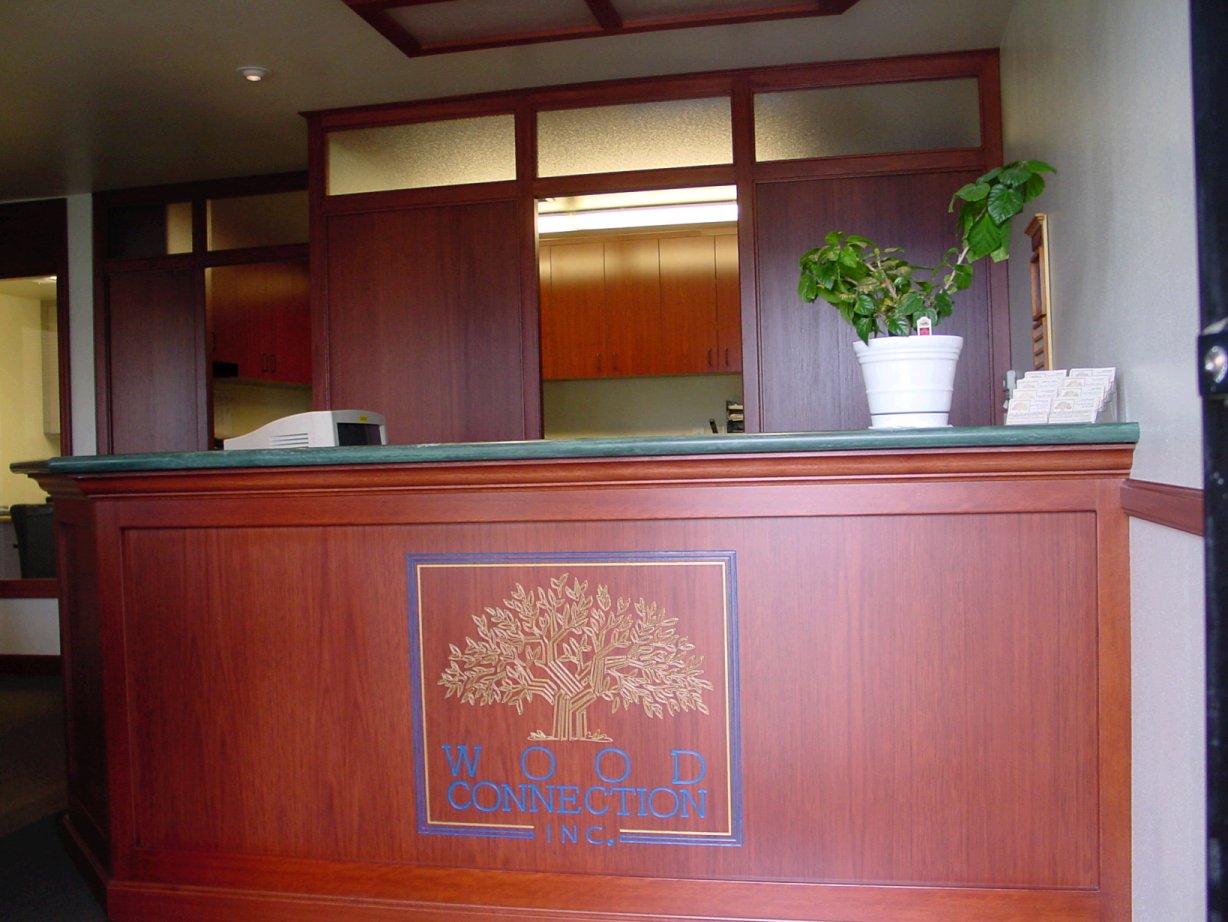
Click here for full size image
From contributor T:
Thanks so much !
As much as we've delved into BPP-Pro I never caught on about this and had usually avoided this type of work. I look forward to giving this a try soon.
From contributor M:
Another good raster to vector program is WinTopo, there is a pretty powerful freeware version. Even WinTopo Pro is not over the top at 500, but combining the freeware version with a good photo editing program, say Irfanview for example, which is free or Paint shop Pro which is somewhere around $100 works very well for this sort of thing.
