Today's
Sponsors:


RouterCAD

RT Machine Co.

Safety Speed Manufacturing

Sand-Rite Manufacturing

Sandman Products

Sawmill and Woodlot Magazine

SCM Group USA

Sears Trostel Lumber Co.

Shop Gear Inc.

ShopBot

ShopSabre CNC

Simantech

Sinker Treasures

SIS Machinery

SNX Technologies

South State Machinery

Southeast Tool, Inc.

Sovereign Machine, Inc.

Specialtytools.com

Speed Sander

Sprayguncaptain.com

Star Hanger

Steve H. Wall Lumber Co.

Stiles Machinery

Stiles Shop Solutions

Super Source Tooling Inc.

Supergrit Abrasives

Omnitech Systems

Onsrud Cutter

Optisol for Project Scheduling

Orange Aluminum

Original Saw Company

Osborne Wood Products

Paragon Enterprises

Patrick Lumber Company

Penn Sylvan International

People Logic Software Corp.

Pinske Edge

Pioneer Lumber Company

Planit Solutions

Preservation Solutions

Prime Estimating and Software Services, LLC

PrimesItALL

Primo Woodworking Machinery

PRO100USA.com

Professional Machinery Group

PSL Optimization Software

Quality VAKuum Products, Inc.

Quickscrews International Corporation

QuickScribe

QuickWood, Inc.

QuikDrawers

R&R Drummond, Inc.

R.A.W.

RazorGage

Rex Lumber Company

Riethmiller Lumber

Ritter Manufacturing Inc.

Roberts WebForge, Inc.

Rockler Woodworking and Hardware

Roger Shaw and Associates

Rose Machinery


CAD Rendering Tips

      AutoCAD may not have the best or easiest rendering engine, but it can do the job. January 10, 2006

Question
How would ACAD render a high quality image to size 15"x10.25" at 300dpi?

Forum Responses
(CAD Forum)
From contributor M:
In paper space, set your paper size to whatever size you want from page setup manager. Draw viewport. Double click in it, size your object as you desire. Then render it. If you want really good results, AutoCAD does not have those capabilities. You can transfer your file in to VIZ or 3D Maxx and render it there.


From contributor S:
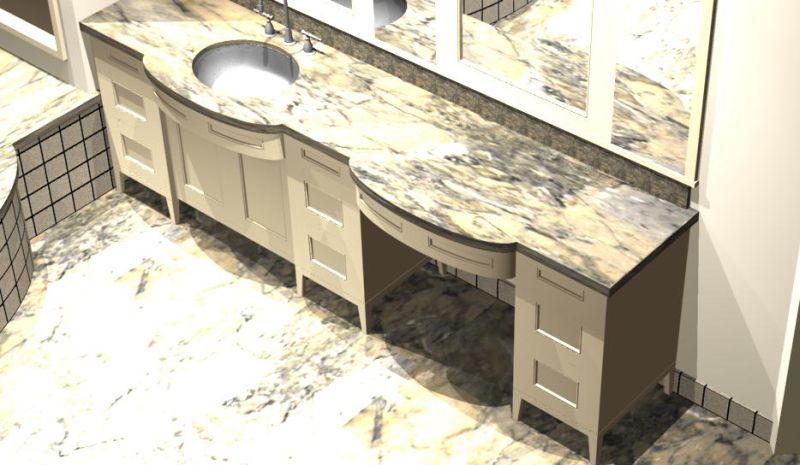
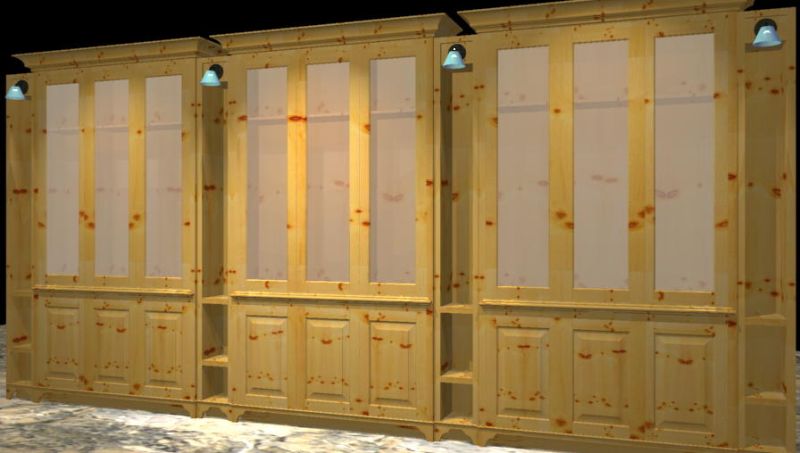
If you are talking about rendering a 3D model, AutoCAD actually has a very good rendering engine. The image below is a rendering I did in plain old AutoCAD 2002. It takes a lot of practice and patience to master rendering in AutoCAD (the Acad help file is a very good source). Once you have your 3D object, the basic commands you need to master are Render, Rmat, 3dorbit and Light to achieve good results.

As far as getting the image to size to 15” x 10.25” at 300dpi, unfortunately you will need to render to a file (preferably a .tiff for printing) and use an imaging program like Photoshop or Paint Shop Pro to change your dpi to 300 and resize the image to a printable size like you mention. This is because AutoCAD will render pixels only (e.g. 1600 x 1200) at a dpi of 72, so an imaging program is required to adjust to the format you are looking for.

From contributor K:
I agree with the above that although ACAD does not have the best rendering capabilities out there, the renderings give a more than adequate representation for visualization purposes most of the time, and are fairly easy to accomplish . Here is a low resolution sample of ours.


Click here for full size image


Click here for full size image


Would you like to add information to this article?
Interested in writing or submitting an article?
Have a question about this article?


Have you reviewed the related Knowledge Base areas below?
  • KnowledgeBase: Knowledge Base

  • KnowledgeBase: Computerization

  • KnowledgeBase: Computerization: CAD Computer Related Design


    Would you like to add information to this article? ... Click Here

    If you have a question regarding a Knowledge Base article, your best chance at uncovering an answer is to search the entire Knowledge Base for related articles or to post your question at the appropriate WOODWEB Forum. Before posting your message, be sure to
    review our Forum Guidelines.

    Questions entered in the Knowledge Base Article comment form will not generate responses! A list of WOODWEB Forums can be found at WOODWEB's Site Map.

    When you post your question at the Forum, be sure to include references to the Knowledge Base article that inspired your question. The more information you provide with your question, the better your chances are of receiving responses.

    Return to beginning of article.


    Refer a Friend || Read This Important Information || Site Map || Privacy Policy || Site User Agreement

    Letters, questions or comments? E-Mail us and let us know what you think. Be sure to review our Frequently Asked Questions page.

    Contact us to discuss advertising or to report problems with this site.

    To report a problem, send an e-mail to our Webmaster

    Copyright © 1996-2013 - WOODWEB ® Inc.
    All rights reserved. No part of this publication may be reproduced in any manner without permission of the Editor.
    Review WOODWEB's Copyright Policy.

    The editors, writers, and staff at WOODWEB try to promote safe practices. What is safe for one woodworker under certain conditions may not be safe for others in different circumstances. Readers should undertake the use of materials and methods discussed at WOODWEB after considerate evaluation, and at their own risk.

    WOODWEB, Inc.
    335 Bedell Road
    Montrose, PA 18801

    Contact WOODWEB


  • WOODWEB - the leading resource for professional woodworkers


      Home » Knowledge Base » Knowledge Base Article