Measurement Tools for PDF Drawings
Notes on a couple of apps that will let you pull dimensions on a PDF drawing. March 27, 2012
Question
I've been getting plans to bid sent to me in PDF format. Problem is, the dimensions I need are not always there in the drawing! But, I’ve found a great solution. It's a little application called "Screen Calipers". With it I can easily measure anywhere, right on the screen. If you have this problem, I recommend it with 5 stars. Here is a screen shot:
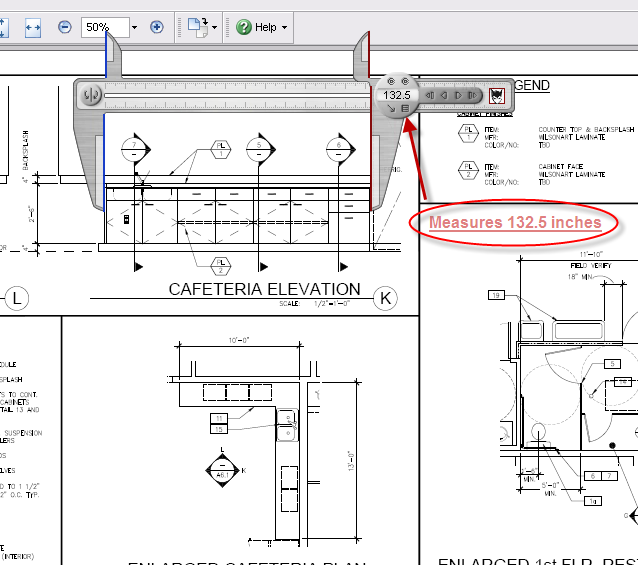
Click here for higher quality, full size image
Forum Responses
(CAD Forum)
From contributor F:
Bluebeam revue cad version has calibrated measuring within the program, along with the ability to count items and footage with your own labels. It’s well worth the $199. You can also make a complete set of Autocad PDF quickly that is editable and can add and insert and delete pages.
From contributor M:
That's really neat. I've been using PDF-XChange Viewer, it has some markup options and will let you set a scale and pull distances. The best part is it’s free.
From contributor T:
I use PDF-Xchange Viewer. It's a free download with features that are blocked unless you pay. One of the features that isn’t blocked is measuring.
From the original questioner:
Contributor M and Contributor T - I downloaded the trial version of Xxchange Viewer and played around with the measure tool - wow! I like it better than Screen Calipers for my purposes. Thanks.
From the original questioner:
I am using "pdf2cad" good on simple stuff. It’s not so good on full-blown, multi-layer architectural drawings. That's why I like the measure tool. No conversion needed.
