Resolution in 3D CNC Carving
Tips on how to improve the rendering of fine detail in three-dimensional woodcarving using a CNC router. August 29, 2006
Question
I would like your honest opinion about my first try at 3D carving. I used a 1/8 ball nose as a final cutter. What should I do to get better details?. Should I use a smaller cutter?
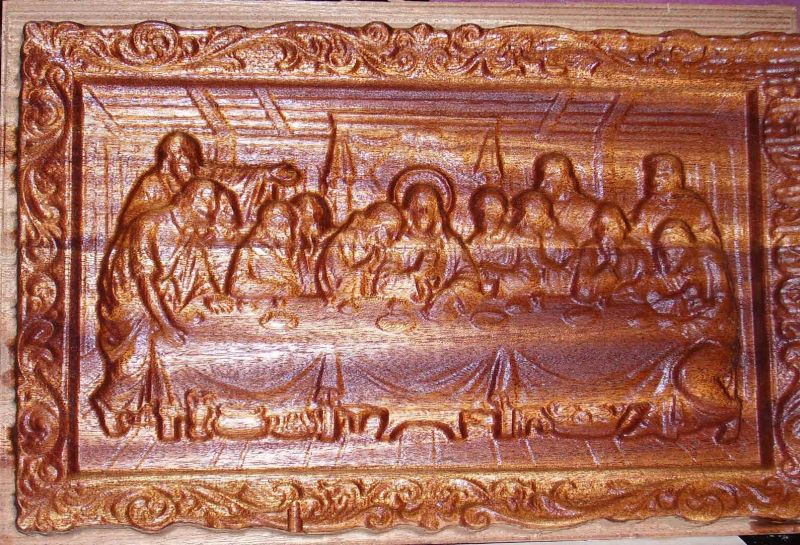
Click here for full size image
Forum Responses
(CNC Forum)
From contributor T:
It's hard to say without more information. How large is the entire picture? The final result will be no better than the original 3D CAD file. Assuming that the 3D CAD information is detailed enough, it looks like you are only using a roughing routine. I recommend going over the entire picture with the 1/8" bit, and make sure that you have the final pass set at zero tolerance. If your CAM program has something called REST machining, use that and go back over the carving with a 1/16" ball nose cutter and clean up the corners, which will give you the detail you want.
From contributor F:
To increase resolution, you need to make sure that look ahead is turned on. It will run slower, but the detail will pop more. Fanuc G8P0 is off, G8P1 is on.
From contributor A:
In my 3D program (Enroute), there is a percent overlap. The greater the overlap, the better it is on details. I would assume all programs have this, or something like it. Also, check the clean, rough setting. Like contributor T, I have a rough pass with a .125 ball nose bit and a clean pass with the same bit. I've never needed a 1/16 bit, but I can see where it would be better at detailing than what I'm using. By the way, how long did it take your CNC to cut this? What software?
From the original questioner:
The size is 10x15 from a laser scan. Using Enrout 3pro. The 1/8 was clean up pass with 90% overlap.
From contributor K:
I work with scan point cloud data all the time. 1 of 2 things possible using scan data.
1. The geometric data is rounded during the point cloud filter operation the scan of the object. Filter clean up of STL by curvature works best.
2. Use a flat end mill, not a ball end mill.
No need to pick out the corner material when using flat cutter. No REST material machining needed.
From contributor J:
A couple of things for resolution. Smaller tool diameter or higher percent of overlap will increase the resolution. Looking closely, though, I would guess that you are seeing the ball ends radius as your limiting item in resolution, so smaller tooling would help. Another item for determining machining resolution can be the resolution that you scanned at. If you have taken a smaller scan and stretched it, your point density of your scan could be the limiting factor to the resolution that you are able to reproduce the data.
