Home » Knowledge Base » Knowledge Base Article What's New  |  Site Map 


Today's
Sponsors:


Unique Machine & Tool

University of Wisconsin

UWMO Auctions

VacDry Kilns

Vacuum Pressing Systems, Inc.

Vacuumpods.com

Vecoplan LLC

Vector Art 3D

Vectric Ltd.

Veneer Systems Inc.

Veneer Technologies Inc.

Vintage Perkins

VortexTool Co. Inc.

VyTek

W. Moore Profiles, Ltd.

W.L. Fuller

Wadkin North America

Wagner Electronic Products

WalzCraft Industries

Webb Abrasives

WEIMA America, Inc.

Weinig Group - USA

Western Dovetail

Williams and Hussey

Wisconsin Knife Works

WMIA

WMMA

Wood and Wood Products

Wood Doctor's Rx, LLC

Wood Tech Enterprises, Inc.

Wood Technology Inc

Wood-Mizer

Wood-Ply Lumber Corp.

WoodCabinetDoors.Com

Woodcraft Supply Corp.

WoodcraftPlans.com

WoodenBoat

WoodFinder

WoodJobs.com Search Consultants

WoodLINKS

Woodmaster

WoodPlanet Inc.

WOODWEB

Woodworker's Supply/woodworker.com

Woodworker's Directory

Wright Timber

Stairguy Stairbuilding Videos

Stefani

Steve H. Wall Lumber Co.

Stiles Machinery

Stiles Shop Solutions

Stor-N-Fold Systems

Super Source Tooling Inc.

Supergrit Abrasives

Superior Wood Products

T-Tool USA LLC

Target Coatings

Techno CNC Routers

Template Services

Teragren

The Cayce Company

The Veneer Store

Thermwood Corporation

Tiger Wood Ltd.

TigerStop

TigerwoodDecking.com

TimberKing

Timesavers Inc.

TMS Machinery Sales

Tongass Forest Enterprises

Tooling on the Web

Toolstoday.com

Touch Up Solutions LLC

Tractivity

TradeJobPlacement.com

TradeSoft

Trakware Systems Inc.

TRB Flooring Company

Tropical American Tree Farm

Tropical Hardwoods

UC Coatings Corp.


WOODWEB DISCLAIMS any and all RESPONSIBILITY and LIABILITY for the accuracy and application of the information below. Readers agree to evaluate the significance and limitations of the information provided, and accept full responsibility for the application of this information. Read More ...

Would you like to add information to this article?
Interested in writing or submitting an article?
Have a question about this article?


Safe Design and Operation of Portable Circular Power Saws       Two hands on the saw is the safest way, say the safety experts. September 16, 2005

Two Hands Safety Control

Reprinted with permission of the Wood Machining Institute and Ryszard Szymani.

According to a recent article by John Drengerberg (2003), Manager of Consumer Affairs for Underwriter Laboratories (UL), “Power saws make any home fix-it job easier, but be careful - contact with saw blades spinning at 5000 revolutions per minute sends more than 84,000 people to emergency rooms every year.” www.ul.com/seasonal/spring/saws.html

Safe Operation Requires Two Hands on the Saw
The experts in woodworking have recognized for over half the century that safe operation of a power circular saw requires both hands to be on the saw while the saw is running. Examples of statements to this effect are: (1) National Safety Council, Accident Prevention Manual for Industrial Operations (1946), p. 406, with respect to “Power driven hand saws”: “Safe practices to be required of the operator are listed below: 1. Hold the saw with both hands;” (2) Particular Requirements for Circular Saws and Circular Knives, UL Standard 745-2-5, published March 23, 1995 ”If both hands are holding the saw, they cannot be cut by the blade” and (3) The OSH Answers, Safety Hazards, Powered Hand Tools, Saws –Circular, published by Canadian Centre for Occupational Health and Safety, Last Updated on March 28, 1998: “Use two hands to operate saws-one on a trigger switch and the other on a front knob handle.”

Unfortunately, most users of circular saws are unaware that they should always hold the saw with both hands, in order to prevent injury to their “free hand”. The common and unsafe practice is to hold a circular saw with one hand, while holding the material being cut with the other hand. A possible source of this unsafe procedure can be found in illustrations, even those distributed by safety organizations that show circular saw users holding the material to be cut with one hand and the saw with the other hand. For example, the National Safety Council’s Data Sheet I-675 Rev. 86, published in 1986, entitled “Electric Hand Saws, Circular Blade Type” shows on its first page a photo of a user cutting wood while holding the circular saw in his right hand and holding the wood with his left hand. The current OSHA website under a section titled “Handheld Saws” also displays a similar illustration.

See www.osha.gov/SLTC/etools/machineguarding/saws/handheld_saws.html, page 2 of 4.

Power Saw Design Modification: Two Hand Operating Feature
Using the two hands safety control in devices that can seriously injure users’ hands if one of them is “free” is a traditional safety measure. A simple and inexpensive way to ensure that the user must keep both hands on the power saw is to add a second switch and to wire it so that the saw will not operate unless both hands are on both switches simultaneously. I have modified the Porter-Cable Saw Model 743K that I purchased in January 2004. Specifically, I had a second switch installed on the front knob handle of the power saw (See illustration below). The modified Porter Cable Model 743K power saw, left handed with a second switch installed by the Wood Machining Institute on the LHS of the front knob handle.
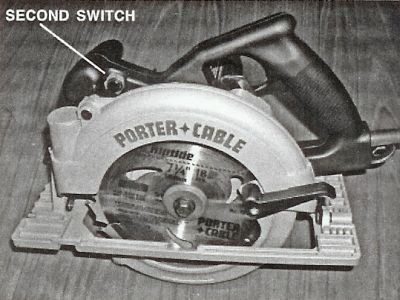

Porter Cable model 743 power saw, left handed with a second switch installed by the Wood Machining Institute of the LHS of the front knob handle. Photo by R. Szymani, January 2004

The saw operates efficiently and requires both hands to run it. For this case the cost of installing this second switch on the front knob handle would be no more than $5.00 per saw for the saw manufacturers. The other safety feature that is not used or required in the USA is the riving knife as described in Wood Machining News, November-December 2001 and July-August 1996.

Reprinted with permission of the Wood Machining Institute and Ryszard Szymani.


Have you reviewed the related Knowledge Base areas below?
  • KnowledgeBase: Knowledge Base

  • KnowledgeBase: Dust Collection, Safety, Plant Management: General

  • KnowledgeBase: Dust Collection, Safety, Plant Management: Safety Equipment


    Would you like to add information to this article? ... Click Here

    If you have a question regarding a Knowledge Base article, your best chance at uncovering an answer is to search the entire Knowledge Base for related articles or to post your question at the appropriate WOODWEB Forum. Before posting your message, be sure to
    review our Forum Guidelines.

    Questions entered in the Knowledge Base Article comment form will not generate responses! A list of WOODWEB Forums can be found at WOODWEB's Site Map.

    When you post your question at the Forum, be sure to include references to the Knowledge Base article that inspired your question. The more information you provide with your question, the better your chances are of receiving responses.

    Return to beginning of article.


    Refer a Friend || Read This Important Information || Site Map || Privacy Policy

    Letters, questions or comments? E-Mail us and let us know what you think. Be sure to review our Frequently Asked Questions page.

    Contact us to discuss advertising or to report problems with this site.

    To report a problem, send an e-mail to our Webmaster

    Copyright © 1996-2008 - WOODWEB ® Inc.
    All rights reserved. No part of this publication may be reproduced in any manner without permission of the Editor.
    Review WOODWEB's Copyright Policy.

    The editors, writers, and staff at WOODWEB try to promote safe practices. What is safe for one woodworker under certain conditions may not be safe for others in different circumstances. Readers should undertake the use of materials and methods discussed at WOODWEB after considerate evaluation, and at their own risk.

    WOODWEB, Inc.
    RR4 Box 265A
    Montrose, PA 18801

    Contact WOODWEB